TL;DR: If you write Scrapy, you already know how to write Netweir. A typical spider moves across with three lines changed, and your selectors, loaders, pipelines and middlewares come with it. A handful of things don't carry over yet, and I'd rather list them than have you find them. Not ready to move? You can keep Scrapy and let Netweir do the fetching.
Nobody rewrites forty working spiders for a benchmark. I wouldn’t, and I built the thing.
So when I designed Netweir, the plan was never to make Scrapy users learn something new. It was to keep the shape you already think in (spiders, callbacks, items, pipelines, middlewares) and swap out what’s underneath: fetching that looks like Chrome, a parser in Rust, and a crawl queue that lives outside Python.
I’ve just written the full field guide on the Netweir blog. This is the shorter version, and the part I think matters most.
Three Lines
The spider you've already written
Here’s the spider almost everyone has a version of, the one that walks books.toscrape.com. These are the lines that change when it moves:
- import scrapy
+ import netweir

- class BooksSpider(scrapy.Spider):
+ class Books(netweir.Spider):
      name = "books"
      allowed_domains = ["books.toscrape.com"]
      start_urls = ["https://books.toscrape.com/"]
-     custom_settings = {"CONCURRENT_REQUESTS": 16, "DEPTH_LIMIT": 3}
+     settings = netweir.Settings(concurrency=16, max_depth=3)

-     def parse(self, response):
+     def parse(self, page):
-         for book in response.css("article.product_pod"):
+         for book in page.css("article.product_pod"):
              yield {
                  "title": book.css("h3 a::attr(title)").get(),
                  "price": book.css(".price_color::text").get(),
              }
-         yield from response.follow_all(css="li.next a", callback=self.parse)
+         yield from page.follow_all(page.css("li.next a::attr(href)"), callback=self.parse)
Leave the import and the renames aside and three real changes are left.
The settings become a typed object. That one’s my favourite, because a misspelt setting is now an error instead of a setting that quietly does nothing for three weeks. The callback gets a page rather than a response. And the link is selected right down to its href, because follow_all takes URLs, not <a> elements.
Then you run it the way your hands already expect:
netweir crawl books.py -o books.jsonlOut of the box it reads robots.txt, skips pages whose owners reserve text and data mining rights, paces each site by how quickly it answers, and drops duplicate URLs, including the ones that only differ by utm_ tags.
What Comes With You
Most of it, honestly
Your selectors should work unchanged. ::text and ::attr(), get() and getall(), re() and re_first(), all of XPath 1.0 with parsel’s extras. Item loaders carry over with a change of import, from netweir.loader, and on a listing of a thousand products they take about three quarters of the time itemloaders and parsel do.
Pipelines written for Scrapy work as they are. What changes is where you list them: pipelines = [Database] on the spider, instead of dotted paths with numbers in ITEM_PIPELINES. Middlewares go the same way. A CrawlSpider becomes rules = [netweir.Follow(...)] on an ordinary spider. And the command line is the one you know: startproject, genspider, crawl, shell, check, with netweir serve standing in for scrapyd.
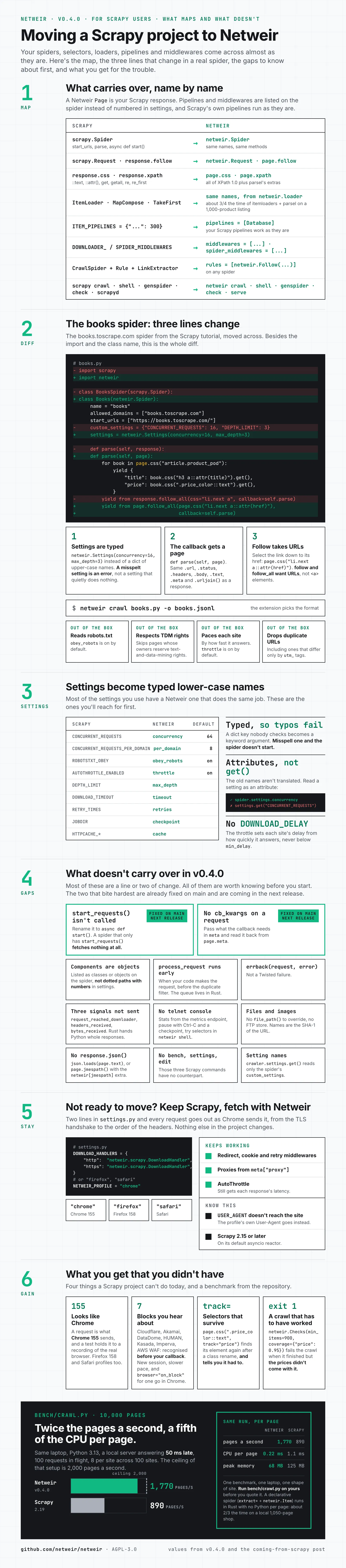
Read the infographic as text
- What carries over, name by name:
scrapy.Spiderwithstart_urls,parseandasync def start()becomesnetweir.Spiderwith the same names.scrapy.Requestandresponse.followbecomenetweir.Requestandpage.follow.response.cssandresponse.xpathbecomepage.cssandpage.xpath, with::text,::attr(),get,getall,reandre_first, all of XPath 1.0 and parsel’s extras.ItemLoader,MapComposeandTakeFirstkeep their names and come fromnetweir.loader, in about three quarters the time of itemloaders and parsel on a 1,000-product listing.ITEM_PIPELINESbecomespipelines = [...]on the spider, and your Scrapy pipelines work as they are.DOWNLOADER_MIDDLEWARESandSPIDER_MIDDLEWARESbecomemiddlewaresandspider_middlewareslists.CrawlSpider,RuleandLinkExtractorbecomerules = [netweir.Follow(...)]on any spider.scrapy crawl,shell,genspiderandcheckbecomenetweir crawl,shell,genspiderandcheck; scrapyd becomesnetweir serve. - The books.toscrape.com spider changes three lines, besides the import and the class name.
custom_settings = {"CONCURRENT_REQUESTS": 16, "DEPTH_LIMIT": 3}becomessettings = netweir.Settings(concurrency=16, max_depth=3), and a misspelt setting is an error instead of a setting that quietly does nothing.def parse(self, response)becomesdef parse(self, page), with the same.url,.status,.headers,.body,.text,.metaand.urljoin().response.follow_all(css="li.next a", ...)becomespage.follow_all(page.css("li.next a::attr(href)"), ...), because follow takes URLs, not<a>elements. Run it withnetweir crawl books.py -o books.jsonl; the extension picks the format. Out of the box it reads robots.txt, skips pages whose owners reserve text-and-data-mining rights, paces each site by how fast it answers, and drops duplicate URLs, including ones that differ only byutm_tags. - Settings become typed lower-case names:
CONCURRENT_REQUESTSisconcurrency(64 by default),CONCURRENT_REQUESTS_PER_DOMAINisper_domain(8),ROBOTSTXT_OBEYisobey_robots(on),AUTOTHROTTLE_ENABLEDisthrottle(on),DEPTH_LIMITismax_depth,DOWNLOAD_TIMEOUTistimeout,RETRY_TIMESisretries,JOBDIRischeckpointandHTTPCACHE_*iscache. The old names aren’t translated: readspider.settings.concurrency, notsettings.get("CONCURRENT_REQUESTS"). There is noDOWNLOAD_DELAY; the throttle sets each site’s delay from how quickly it answers, never belowmin_delay. - What doesn’t carry over in v0.4.0.
start_requests()isn’t called, so rename it toasync def start(); a spider that only hasstart_requests()fetches nothing at all. There is nocb_kwargson a request, so pass what the callback needs inmeta. Both of these are fixed on main and coming in the next release. Also: components are listed as classes or objects, not dotted paths with numbers;process_requestruns when your code makes the request, before the duplicate filter; an errback gets(request, error), not a Twisted failure;request_reached_downloader,headers_receivedandbytes_receivedaren’t sent; there is no telnet console (use the metrics endpoint, Ctrl-C with a checkpoint, andnetweir shell); files and images have nofile_path()override and no FTP store, and names are the SHA-1 of the URL; there is noresponse.json()(usejson.loads(page.text)orpage.jmespath()with thenetweir[jmespath]extra);scrapy bench,settingsandedithave no counterpart; andcrawler.settings.get()reads only the spider’scustom_settings. - Not ready to move? Keep Scrapy and let Netweir fetch. In
settings.py, setDOWNLOAD_HANDLERSforhttpandhttpstonetweir.scrapy.DownloadHandlerandNETWEIR_PROFILEto"chrome","firefox"or"safari". Every request then goes out as that browser sends it, from the TLS handshake to the order of the headers. Scrapy’s redirect, cookie and retry middlewares, proxies frommeta["proxy"]and AutoThrottle keep working. YourUSER_AGENTsetting doesn’t reach the site, because the profile’s own User-Agent goes instead. It needs Scrapy 2.15 or later on its default asyncio reactor. - What you get that you didn’t have: a request is what Chrome 155 sends, held to a recording of the real browser, with Firefox 158 and Safari profiles too. Block pages from Cloudflare, Akamai, DataDome, HUMAN, Kasada, Imperva and AWS WAF are recognised before your callback; the crawl retries with a new session, slows the site, and
browser="on_block"gives a stubborn request one go in Chrome.track="price"on a selector finds its element again after a class rename and tells you it had to.checks = [netweir.Checks(min_items=900, coverage={"price": 0.95})]makesnetweir crawlexit 1 when the crawl finished but the prices didn’t come with it. - The benchmark in the repository (
bench/crawl.py: 10,000 pages across 100 sites, a local server answering 50 ms late, 100 requests in flight, 8 per site, same laptop, Python 3.13) has Netweir at 1,770 pages a second, 0.22 ms of CPU per page and 68 MB peak, against Scrapy 2.19 at 890 pages a second, 1.1 ms per page and 125 MB. The ceiling of that setup is 2,000 pages a second. One benchmark, one laptop, one shape of site: run it on yours before you quote it. A declarative spider (extract=plusnetweir.Item) runs in Rust with no Python per page, about two thirds the time on a local 1,050-page shop.
What Doesn’t, Yet
Better you hear it from me
A migration guide that only lists what works isn’t a guide. It’s an advert. So here are the gaps in v0.4.0, the current release, that you’re most likely to trip over:
start_requests()isn’t called. Netweir uses Scrapy 2.13’sasync def start(), so rename the method. A spider with onlystart_requests()fetches nothing at all.- There’s no
cb_kwargs. Pass what the callback needs inmetaand read it back frompage.meta. - Scrapy’s setting names aren’t translated. It’s
spider.settings.concurrency, notsettings.get("CONCURRENT_REQUESTS"). - An errback gets
(request, error), not a Twisted failure. - There’s no telnet console and no
DOWNLOAD_DELAY. The throttle sets each site’s delay from how fast it answers, and the stats come from a metrics endpoint.
The first two have already been fixed on the main branch, so they’ll go away in the next release. Until then, they’re real, and that’s why they’re at the top. The full guide has the complete list, every one of them a line or two of change.
Not Ready to Move? Don’t.
Keep Scrapy, change how it fetches
This is the bit I’d try first, if I were you. You can leave the whole project on Scrapy and hand only the fetching to Netweir, with two settings:
DOWNLOAD_HANDLERS = {
    "http": "netweir.scrapy.DownloadHandler",
    "https": "netweir.scrapy.DownloadHandler",
}
NETWEIR_PROFILE = "chrome"  # or "firefox", "safari"
Every request then goes out as Chrome sends it, from the TLS handshake to the order of the headers. Scrapy’s redirect, cookie and retry middlewares keep doing their jobs, your proxies in meta["proxy"] still work, and AutoThrottle still sees each response’s latency. One catch: the user agent comes from the browser profile, so your USER_AGENT setting won’t reach the site. It needs Scrapy 2.15 or later on the default asyncio reactor.
Nothing else in your project changes. If the blocks stop, you’ve learnt something without rewriting a single spider.
What You Get for Three Lines
The reason to bother
Why move at all, if Scrapy works? Because of what tends to happen around page 600.
Netweir recognises block pages from Cloudflare, Akamai, DataDome, HUMAN, Kasada, Imperva and AWS WAF before your callback sees them, then retries with a fresh session and slows that site down. Write track="price" on a selector and it finds the element again after a redesign renames the class, and tells you it had to. Add checks = [netweir.Checks(min_items=900, coverage={"price": 0.95})] and netweir crawl exits 1 when the crawl finished but the prices didn’t come with it. That last one is the empty column you’d otherwise find a week later.
And there’s speed. On the crawl benchmark in the repository (10,000 pages from a local server answering 50 ms late, 100 requests in flight) Netweir fetched 1,770 pages a second to Scrapy 2.19’s 890, using about a fifth of the CPU per page. The ceiling in that setup is 2,000. Netweir spends most of its time waiting on the server, which is where a crawler should spend it.
Try It on Your Own Spider
And tell me where it breaks
pip install netweir
netweir crawl books.py -o books.jsonl
Point it at a spider you already have. If something from your Scrapy project doesn’t come across and you think it should, open an issue with the spider, or the smallest piece of it that shows the problem. Gaps like the two at the top of that list are exactly what I want to hear about.
Share