TL;DR: circuit-openwebui runs Open WebUI, a chat page in the browser, on your own host, in front of models you choose. Nobody can sign up, nobody sees a model until you grant it, the chats stay on the box, and prompts go only to the model servers you connect.
Ask around and you’ll find it. Someone on your team has a personal ChatGPT account, and this morning they pasted a contract into it. Not out of malice. It was the easiest thing in reach.
You can tell them to stop. That rarely works. What works far more often is handing them something just as easy, on a machine you control.
Open WebUI is that something: a chat page that looks and feels like the one they already use. circuit-openwebui runs it on your own host, and one Conn3x apply sets it up in front of whichever models you pick. The full walkthrough is on the Conn3x blog. This is the short version, and the bit about why.
One Apply, One Chat Page
Ollama for the model, Open WebUI for the people
variable "admin_password" {
  type      = string
  ephemeral = true
  sensitive = true
}

module "ollama" {
  source = "github.com/conn3xorg/circuit-ollama?ref=v0.1.3"

  hosts                = { ai = "192.168.1.50" }
  ssh_private_key_file = "~/.ssh/id_ed25519"

  models = ["qwen2.5:0.5b"]
}

module "openwebui" {
  source = "github.com/conn3xorg/circuit-openwebui?ref=v0.1.1"

  depends_on = [module.ollama]

  hosts                = { ai = "192.168.1.50" }
  ssh_private_key_file = "~/.ssh/id_ed25519"

  admin_email    = "you@example.com"
  admin_password = var.admin_password
}
That’s a small model in Ollama and Open WebUI beside it, on one host. The admin password is ephemeral, so it never lands in your plan or state. Open WebUI’s own secret key doesn’t either: the first apply makes it on the host, and that’s the only place it lives.
What you won’t find is an open port. Open WebUI listens on 127.0.0.1:8080, plain HTTP, and nothing outside the box can reach it. Put circuit-caddy in front for TLS when your team needs it, or try it yourself first with ssh -L 8080:127.0.0.1:8080 root@192.168.1.50.
Every Door Starts Shut
Then you open the ones you mean to
Open WebUI out of the box is built for one person on a laptop. Whoever loads the page first becomes the admin. Handy at home. On a server, that’s a race you don’t want to lose to a stranger.
A chat page you’re about to hand to a whole team should start closed and be opened on purpose. So the circuit shuts four doors before anyone arrives.
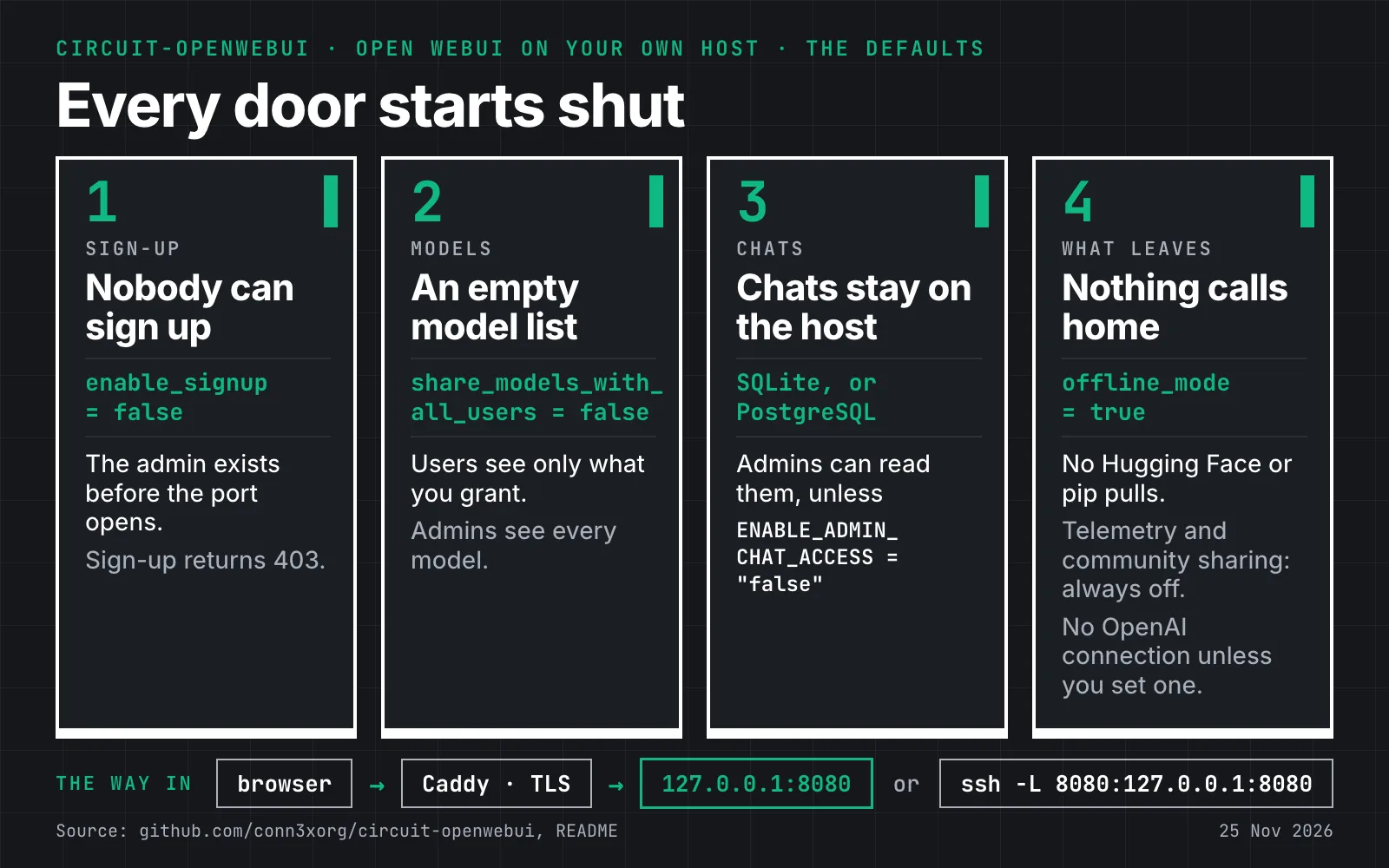
Read the graphic as text
- Sign-up:
enable_signup = false. The circuit creates the first admin before Open WebUI opens its port, so no stranger gets there first. Sign-up returns 403. - Models:
share_models_with_all_users = false. Users see only the models an admin gives them or their group. Admins see every model. - Chats: they stay on the host, in SQLite inside the
open-webuivolume or in PostgreSQL throughdatabase_url. Admins can read users’ chats unless you setenvironment = { ENABLE_ADMIN_CHAT_ACCESS = "false" }. - What leaves: telemetry and community sharing are always off, whatever you set.
offline_mode = truestops Hugging Face downloads, version checks and pip installs. With noopenai_base_url, the default api.openai.com connection is off too, so prompts go only to the model servers you connect. - The way in: Open WebUI listens on
127.0.0.1:8080. Reach it through Caddy, which adds TLS, or withssh -L 8080:127.0.0.1:8080. Source: circuit-openwebui.
The second door surprises people. A new user signs in and sees no models at all. That looks like a bug for about five seconds. For a company, the empty list is the point: you decide who gets the expensive model, and who gets the local one.
And the settings themselves stay put. With persistent_config = false, every restart reads them from what the circuit wrote, not from the database. Somebody flips a switch in the admin panel and it’s back the way your code says on the next restart. Users, groups, grants and chats are untouched.
Two Things to Decide First
Everything else, copy as it is
The first is where the chats go. SQLite in a volume is the default, and fine for a small team. PostgreSQL, through database_url, is the one you’ll want if you already back it up. Pick before the first apply. Switch later and you start again with an empty database.
The second is who can read them. By default, an Open WebUI admin can open anyone’s chats. Some teams need that for compliance. Others would be appalled to learn it. If you’re in the second camp, it’s one line:
environment = { ENABLE_ADMIN_CHAT_ACCESS = "false" }Either way, tell your people which you picked. A private chat page they don’t trust is one they won’t use, and then they’re back on their personal accounts.
Hosted Models Through the Gateway
GPT and Claude, behind the same keys
A small local model won’t be enough for everyone. Point Open WebUI at the LiteLLM gateway from last week’s post instead:
openai_base_url = "http://127.0.0.1:4000/v1"
openai_api_key  = var.litellm_key
Now the provider keys, budgets and spend logs all stay in LiteLLM, and Open WebUI only holds a gateway key, delivered to the host in a root-only file. One honest caveat: a prompt sent to a hosted model leaves the box. That’s what a hosted model is. The gateway decides who may send one and keeps the record; it can’t make OpenAI forget.
What It Won’t Do
So you don't find out on your own
CI applies it to Rocky Linux 10, Fedora 45, Ubuntu 24.04 and Debian 13. It checks that a second plan has nothing to change, that the admin it made can sign in, that sign-up returns 403, and that an old session still works after a restart. By hand, I ran it on a 4 GB Ubuntu droplet with Ollama and PostgreSQL, where a chat got its answer, and on a 2 GB Rocky droplet with SELinux enforcing and SQLite. Open WebUI used about 700 MB on both. Port 8080 didn’t answer from outside on either, and the admin could still sign in after a reboot.
And the gaps:
- No models. It doesn’t install any. That’s circuit-ollama, or a gateway.
- No TLS, no open port. Caddy does the first. You decide the second.
- No user management. Make users and groups in Open WebUI’s admin panel.
- No backups. Back up the
open-webuivolume, and PostgreSQL if you use it. - Upgrades are untested. Moving between
openwebui_versionvalues hasn’t been tried yet. - It’s not small. The image is about 1.6 GB compressed, so leave 10 GB of disk free.
Give Them Something Better
Then see who still needs the personal account
Banning the chatbot fails because it takes something away. This gives something back, a page that works as well, on a box you can point to when someone asks where the data went.
The README has every input, and examples/local runs it on a throwaway container. Next on the Conn3x blog: what happens when someone pastes a customer’s phone number into that chat box. If you put this in front of your team, start a discussion and tell me how long the personal accounts lasted.
Share